Using the EEP Viewer – Second Life

The Enhanced Environment Project is progressing and nearing completion. Thursday Feb 14, 2019 Rider Linden updated us on where they were in development. (Ref) He is expecting the project to move to RC status very soon™. It is now available to test in its ‘project status’ in the Blue Steel and Le Tigre channels of the main Second Life™ grid. So, it may be time to start playing with the feature.

Also, with this feature comes a new item, EEP-Windlight settings, that can be sold on the market place and traded among users. If you have a talent for making sunsets, this may be your niche.

EEP and Non-EEP Viewers Feb 2019

You can get a copy of the Enhanced Environment Project viewer in the Second Life™ Alternate Viewers. As I write we are on version 6.0.2.524123 of this project viewer. It installs in its own directory. So, it won’t break or affect any of your other installed viewers. Updates to this viewer are mandatory. Meaning when a new version of the Project or RC viewer is released you have to install the update to continue using it.

NOTICE: If you click SLURLs to open your viewer and login into the SLURL’s region, installing any viewer will change which viewer Windows uses. Windows uses the last viewer installed. There are tools and tutorials that will help you tell Windows which viewer you prefer for those clicks. See SLURL Proxy.

Read more

Second Life: Photo Backlighting

If you have a Flickr account, you know how popular photography is in Second Life. So, photo-how-to’s are popular too. Then there are the peeps with a bit of exhibitionist in their blood posting in, How does your avatar look today?

Hamlet just posted an article with a couple of video tutorials on backlighting in Second Life. See Cassie’s Clips: How To Use Backlighting & Projectors.

Hamlet is featuring videos by Cassie Middles (Flickr URL). The video shows how to use Cynefin’s Projection Lighting Kit (L$650) (Video below). Mixed in is how to use your Windlight settings and adjust the sun to get the lighting you want.

Cassie also made a video showing how to use the resulting image and improve it. Below.

Read more

Second Life Photography Tutorials

Flickr has a ton of Second Life™ images. Today: 2,901,249 images. Some are pretty bad, others REALLY kinky, and some amazingly gorgeous. For the people interested in SL Photography William Weaver has made 12 video tutorials. They are about using the Firestorm Viewer’s Photo and Camera Tools and controlling Windlight. There is a well thought … Read more

Second Life: Those Scripts You Wear, Which Are Pesky?

I was reading a thread in the forum where the Opening Post (OP) was asking how to deal with scripts. They went somewhere and found out they were wearing too many scripts and were threatened with ejection. Been there done that… it’s been awhile.

About Land – Script Info – Firestorm

Of course, there are the devices that will tell you your script weight. (Weight Scale – free) These generally provide an aggregate weight leaving you to try and figure out which scripts are heavy and lite.

However, the viewer has features you can use to make life easier. In ABOUT LAND (FS: World->Parcel Details – LL: World->About Land) there is a button (bottom-left) labeled Script Info. That pens a panel with the tabs; REGION and AVATAR. (see image) You can see it lists the script weight for each scripted item you are wearing.

NOTE: 2020/05 – Some time ago the Avatar tab was removed. You will have to use the method below to get script info.

You can also right click the ground and select ABOUT LAND.

Read more

Second Life: What Viewer Statistics?

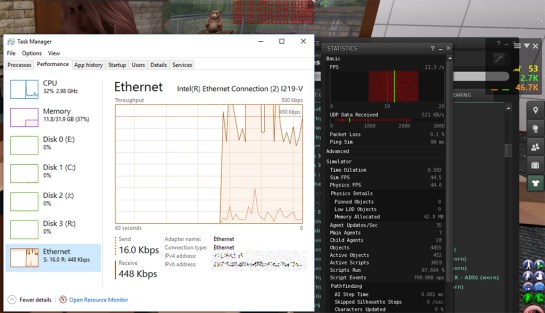
If you have ever pressed Ctrl-Shift-1 to reveal the Viewer Statistics panel and wondered what all the stuff means, there is a good explanation of the items in the panel over at the Firestorm Viewer Wiki. See: Firestorm Viewer Statistics. Almost the same information is available in the SL Wiki: Viewer help: Statistics.

Network Transfer Rate Comparison

I think on both sites they have simplified the text for the less techy users. I think that is a bad idea, as the people looking for explanations of how the items in the panel work are likely tech savvy.

The first four items listed on the pages are the source of a lot of confusion; FPS, Bandwidth, Lost Packets, and Ping. So, I’ll provide a bit more information.

Read more

Second Life: Performance Changing

As the Second Life™ system advances more of the content will be transferred to the viewer by HTTP protocol. This takes load from UDP and the region server-simulators and moves it to the Content Delivery Network (CDN).

Shadow Puppets!
Shadow Puppets!

We expect some degree of region performance improvement, especially in crowded regions with lots of avatars. But, there may be a cost for those on slow Internet connections. It is hard to estimate the impact on those with slow connections. But, there are things they can do if they see performance degrade.

Read more