Third Party Developers’ Meeting 2017 Week 21

Viewers

Not much has changed since week 21… said Oz as he listed off these changes…

There is a new AssetHTTP version. It is doing reasonably well and Oz Linden thinks it likely to promote to the default viewer.

A new Voice RC is out but, it is too new for the Lab to know much about how it is doing.

Also, a new maintenance viewer is out and it too is too new to say much about performance-wise.

.Psychosis.
.Psychosis.

Alex Ivy, the 64-bit version of the Linden project viewer, has been updated. A RC version of it is in QA. The RC is likely to release in week 22.

The Lindens are changing the server side support for viewer update process. This is the process that decides if you should run a 32 or 64-bit version of the viewer. The update process is taking a fair amount of effort. A couple of easier said than done things weren’t anticipated that are being resolved.

Read more

Second Life: Those Scripts You Wear, Which Are Pesky?

I was reading a thread in the forum where the Opening Post (OP) was asking how to deal with scripts. They went somewhere and found out they were wearing too many scripts and were threatened with ejection. Been there done that… it’s been awhile.

About Land – Script Info – Firestorm

Of course, there are the devices that will tell you your script weight. (Weight Scale – free) These generally provide an aggregate weight leaving you to try and figure out which scripts are heavy and lite.

However, the viewer has features you can use to make life easier. In ABOUT LAND (FS: World->Parcel Details – LL: World->About Land) there is a button (bottom-left) labeled Script Info. That pens a panel with the tabs; REGION and AVATAR. (see image) You can see it lists the script weight for each scripted item you are wearing.

NOTE: 2020/05 – Some time ago the Avatar tab was removed. You will have to use the method below to get script info.

You can also right click the ground and select ABOUT LAND.

Read more

Second Life News 2017 w14

Caleb Linden sort of posts the new deploy information for server software. Those posts have gotten progressively shorter providing less and less information. We are down to it being a pasted in URL to the release notes.

Rustic Kitchen 3
Rustic Kitchen 3

This week we did get a roll to the main channel. The only stated change is a tweak to the ‘asset metrics stats’. I think this is for the change to deliver more assets by the Content Delivery Network (CDN). They are collecting information pre-change to CDN. You’ll see the new viewer needed to support this change in the viewer’s list. 

Read more

Second Life News 2017 w12

Servers

There is a roll out to the main channel today, Tuesday. This is the package described as: Added a new internal logging output and changes to increase stability and security.

Gräfin von Chenonceaux

At last week’s Beta Server group meeting they were discussing the next coming package. It will have the change to CDN (Content Delivery Network) of more assets. Something is causing it to fail to grant capabilities to users. I could cam into a failed region but, not enter the region. 

Read more

Second Life News 2017 w10

Servers

Who knows? The Second Life blog/forum is still off line. There is no ETA for its return. Every week or so they post in Grid Status about it being down. Duh! And that it is taking longer than expected to get it going. The excuse is they want to be sure they get it right… the post must be written by a former politician… They blew the time estimate. Software developers ALWAYS run into unexpected problems.

I'll stop the world and melt with you
I’ll stop the world and melt with you

The Grid status seems to be on automatic so, update or not it tells us there is an update. My region device tells me the main channel region I live in has not restarted since 2/24. So, no roll to main channel today (Tuesday) as of 10 AM SLT/PT.

Read more

Second Life: What Viewer Statistics?

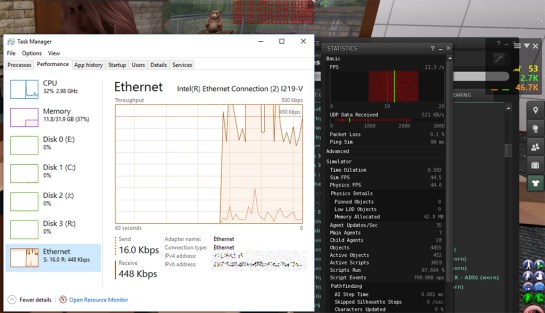
If you have ever pressed Ctrl-Shift-1 to reveal the Viewer Statistics panel and wondered what all the stuff means, there is a good explanation of the items in the panel over at the Firestorm Viewer Wiki. See: Firestorm Viewer Statistics. Almost the same information is available in the SL Wiki: Viewer help: Statistics.

Network Transfer Rate Comparison

I think on both sites they have simplified the text for the less techy users. I think that is a bad idea, as the people looking for explanations of how the items in the panel work are likely tech savvy.

The first four items listed on the pages are the source of a lot of confusion; FPS, Bandwidth, Lost Packets, and Ping. So, I’ll provide a bit more information.

Read more