Second Life Shape Export

I recently decided to buy Avastar-1 (RC2-782) and see if it could solve some problems I’ve run into with posing the avatar for weight painting. I’ve also had some problems getting custom mesh to fit my avatar. Tight skirts require everything be precise. Things weren’t as precise as I hoped. I was getting frustrated.

Comparing In-world with Avastar and OBJ Export

Avastar is an add-on for Blender sold by Machinimatrix.org for US$22. ($27 4/2017) I resisted purchasing it because I wanted to provide tutorials that provide a free path to accomplishing the same things. I’m in the process of updating my tutorial: Second Life Mesh Clothes Blender 2.6 Setup 2012 Tutorial. It’s almost a year old and a few things have changed. 

Read more

Second Life Mesh Clothes Tutorials

Update: See Mesh Deformer Changes for an update on mesh clothing.

There are several people that make tutorials for Second Life™. Others explain aspects of Second Life. We can find their stuff in blogs, web sites, on YouTube and Vimeo, and amazingly enough in the SL Forum. Of all those the stuff in the forum seems to be the hardest to find. So, here are a couple of the forum jewels.

In modeling mesh that moves, avatars and clothes, the arrangement of the vertices and how they form loops of quadrilateral polygons is an important concept to understand. Arranging them well determines how well the model can flex. The arrangement of vertices and faces is referred to as the model’s topology.

Mesh Modeling Topology
Mesh Modeling Topology – By: Codewarrior.

Codewarrior Congrejo has a couple of good tutorials in the SL Forum. I think both are too good to just be buried in the forum. They will get little love from Bing & Google. Quickly they will scroll out of sight on the forum. So, I’m putting links here on my blog.

Read more

Weight Copy Blender 2.66a

New Blender Feature - Transfer Weights
New Blender Feature – Transfer Weights

You will find that the Weight Copy script that many of us have been using with our clothes building doesn’t work in Blender 2.66a. (Some say it does. I’m not sure.) Gaia Clary is not going to be updating the script for newer Blender versions. She doesn’t need to. Blender now has the ‘copy’ function built in.

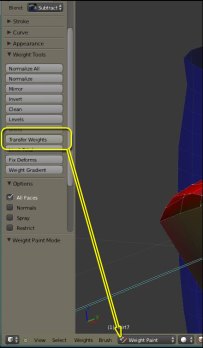
This new feature is only visible when you are in Weight Paint mode. The picture shows the Weight Paint Tools panel open. The eighth position is Transfer Weights (and that links to a short tutorial). This takes the place of Gaia’s script.

This new feature gives us way more control than Gaia’s script did. But the selection order for transfers is the same. Select the SOURCE first and the TARGET second.

You may notice some additional tools there too; Blend, Limit Total, Fix Deforms, and Weight Gradient. Look at Blender.org’s documents page: Weight Paint Mode. There you’ll find explanations of the tools and how they work.

New Penny Patton Shapes Released

I like a lot of the work that Penny does with getting regions and avatars scaled to realistic proportions. So, when I saw that she had released new shapes I wanted to check them out. She has a blog article about them here: More Vitruvian Shapes!

The picture is one she made to show the difference between the Linden Made Shapes and the to-scale-shapes she makes and recommends.

Free Second Life Shapes
New Vitruvian Shapes by Penny Patton

You can find Penny’s Market Place here. The Vitruvian Shapes discussed are here. And the cost is: L$0, which you can’t beat. 

Read more

RedPoly and Mesh Upload

Redpoly has a new tutorial video out. It is for the people buying mesh clothing kits that plan to sell the clothes made from the kit. Check it out and then I’ll explain why the kits are sold in such a complex way.

[youtube epaA9AmD81w]

Creators making mesh clothes and uploading their model are shown as the creator in the objects’ properties in-world. But, if you buy a mesh kit, usually a mesh object and template files, the creator that uploaded the mesh object shows as the creator. This kit misnaming creates problems for everyone.

Read more