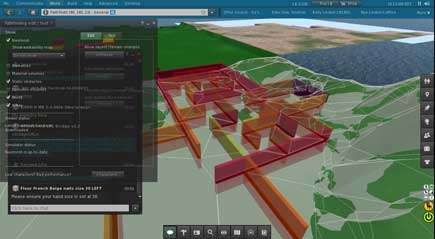
#SL Pyramid Warning Symbols

Recently a number of us have been seeing a flock of organdy-yellow pyramids appear around us when trying on mesh. They look very much like the script warnings we see when a script fails. However, they are a little different in that they do not have the little piece of paper denoting a script within the icon.

These non-script inspired pyramids are caused by mesh failing to rez. It is unclear whether this is solely a viewer issue or a viewer and server issue. Whatever the case, the quick fix is a relog or teleport to another region.

One can also change the viewer settings to reduce the likelihood of being a roosting perch for a flock of pyramids. The setting can only be founds in the Debug Settings.

This is hard to test so I’m doing some speculation on whether or not the change is worth the effort.

MeshMaxConcurrentRequests – Number of threads to use for loading meshes. Default value 32. It is probably better to reduce this setting if you have a slower connection. Try increasing it if you hang out in places like TRUTH Hair. I know at least one person setting this at 256 and claiming it cured the problem. I’m not convinced.

I suggest leaving it at 32 unless you have a significant and persistent problem. If you do decide to change it, try 16 or 64.

I can’t find any other settings that limit mesh render. I seem to remember there were more. But, they have disappeared from recent viewers. So, there is little we can do to avoid the problem.

Singularity Viewer Update

The Singularity Viewer team has been quite and it has been some time since we saw a version release. Work is proceeding and we got a bit of information from Siana Gearz, the managing developer.

Well, the question when it’s coming is something we’re trying to figure out too. What can be said though is that we abandoned non-multiwearable branch recently and all work is being done for multiwearable release. Also we are reorganizing ourselves, i want the team to share the management duties and not just me alone cause my availability can be very mixed. Abandoning half of my life and all of my Second Life for Singularity was not a very awesome plan in the long run i suppose.

Reference SLUniverse: Singularity Viewer

It’s lots of work releasing a viewer. The time to a new release also depends the time developers have available to work on the project. Working on a viewer means one is not in Second Life. I can see it turning into work.

Blender 2.63 Import Problem

Drongle McMahon has been posting this information around. Seems there is a problem when importing mesh into Second Life.

In case anyone else gtets into a mess with this …

Th name of an imported mesh in SL is taken from the “name” attribute of the <geometry> tag defining the mesh. Im Blender 2.49b, the exporter took this attribute from the Blender object name. Unfortunately, in Blender 2.63 it is taken instead from the data block. This means that renaming your objects so that they have reasonable names sfter import is no longer effective. Instead you have to rename the data blocks. You can do that in Outline view or in the property editor for object data (the inverted triangle of vertices).

If you use the same datablock for multiple objects, the exporter uses instancing, with the geometry appearing only once in the collada file, referenced in multiple nodes of the scene, each with their own transformations. Unfortunately, the uploader does not use instancing (although it does reads it properly from the collada). Instead, it ulpoads separate meshes. Since only one of these can use the dtablock name, the others appear to be renamed to “Object”.

Gaia Clary points out in a follow up post that the problem is being fixed in Blender 2.64. See her post.

This issue has been “fixed” by adding a new select option.In fact i believe that the SL Importer takes the Object name from the wrong place. It should use the information provided in the visual scene description. But well…

The new option will be available in Blender 2.64.

#SL Viewer Update Week 21

Today I saw that we have a new Development Viewer out. It is version 3.3.3 (257716).

UPDATE: 2012-05-27 – Version 3.3.3 (258100) is out.

I’ve had some interesting experiences with it. The previous version had horrendous memory leaks. In a couple of hours I would be down to 6 to 8 FPS and memory consumption would be approaching 1.5 gigabytes.

This version took an unusually long time to initialize the texture cache when I first started it. That seems to have been a one time thing. But, I haven’t had much time to play with this version. I’ve been too busy redoing my clothing tutorial.

Once I started the viewer and in 5 minutes it crashed. I have no clue what happened. The next time I ran the viewer for over two hours with no problems.

I also find my Core2 Quad w/GTX560Ti is running at 15 FPS at times when it used to be running at 6-8 FPS.

Not for Everyone

If you are not into problems and cutting edge tech, avoid trying the Development Viewer. The viewer is not intended for every day use. It is a pre-Beta version.

However, if you want to help the Lindens with crash and bug reports then jump right in.

#SL Lab’s Viewers Update Week 21

Standard Viewers

Today there is a new release if the Lab’s Development viewer: 3.3.3 (257716). This is a big jump from 3.3.3 (255954).

The Beta viewer version is: 3.3.2 (2557442).

The main viewer is: 3.3.1 (254524).

Mesh Deformer Testing

You can get the latest Mesh Deformer Project Viewer, version: 3.3.1 (255595). There are a number of mesh items to test in Hippo Hollow.

Pathfinding

You can get the latest Pathfinding Project Viewer, version: 3.3.2 (256513). There are Pathfinding test regions in ADITI and AGNI. The server code is cutting edge and updated sometimes several times per day in ADITI. The Main Grid AGNI regions can run several days behind.

#SL News Update Week 19

Mesh Deformer Examples

It seems Inara & I are credited in some measure for getting the word out that mesh clothing examples are needed. Oz says a steady stream of examples are coming in now. If you want any say in how the Mesh Deformer works, get your samples to Oz Linden.

Server Beta Test Group

Spell Checking

Eventually the Linden SL Viewer will get spell check for chat. There is some user interface feedback to be handled and a couple of fixes. Then it can be merged into the viewer and begin moving through the QA pipe. No telling when the work will be completed.

The dictionaries to be packaged with the spell check are; US and UK English, Spanish Spanish, and Brazilian Portuguese.

See STORM-83Interactive Spell Checking. Also get a copy of the Spelling Project viewer.

People Search

There is some cleanup work for display names that is incomplete that apparently affects people search. Hopefully the cleanup work make people search better. Until then you may find it works better if you type in a name and click the drop down to search for people.

Read more