Second Life: Mesh Upload

You may have picked up from the SL Viewer news that a change is coming to the Lab’s mesh uploader. There are, I think, some nice changes coming.

WA D-Lab PICCOLI2 IN YOUR GARDEN
WA D-Lab PICCOLI2 IN YOUR GARDEN by Willow, on Flickr

As it is now, when uploading mesh we often get an error and the error message is basically useless, no help. The Lindens are working to improve that. They hope to give us a better idea of what went wrong.

Also, we are currently limited to 8 faces per mesh. That means any single mesh object can only have 8 materials. That too is going to change. The Lindens are saying if there will be a new limit just that we can have more than 8.

There is also something changing about how the various LoD models and physics models will associate with our item based on file naming. I don’t get what they are doing here as I have yet to play with the RC/Project viewer that is out.
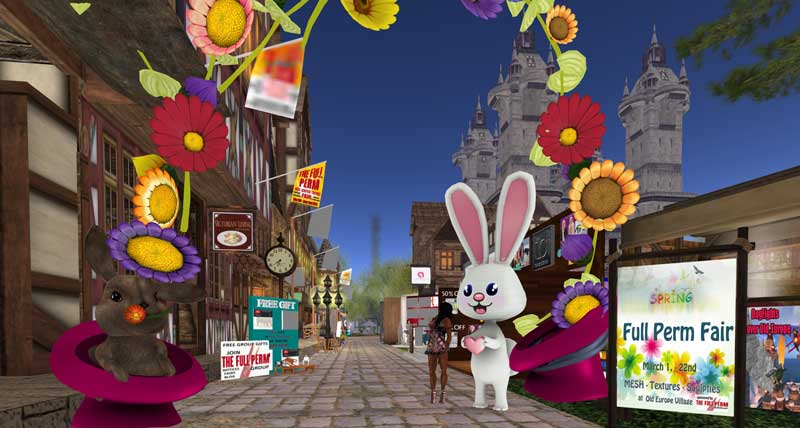
Second Life’s Full Perm Fair

I had never heard of it. But this is apparently the 6th fair. It’s an interesting event with a ton of Full Perm stuff for sale. I runs from March 1 to 22. You’ll find it in Old Europe Village. It is small but jam packed.

Full Perm Fair - March 2015
Full Perm Fair – March 2015

I am guessing the purpose of the fair is to provide source items for people good at texturing and weak at mesh modeling.

Read more

Avatar Render Cost 2015-07

Penny Patton writes about reducing her avatar’s render cost. (See: Draw Weight.) Kay Jiersen picked up on the article and wrote an article too. (See: Render weight best practices for Second Life.) Some time ago I wrote: Second Life Performance: Render Muting, which is about the same subject.

Penny Paton's Example of Dense High ARC Mesh
Penny Patton’s Example of Dense High ARC Mesh

Penny is pointing out there is a bit we can do to change our render cost with only a minimal change in appearance. Kay suspects few people are even aware of the Avatar Render Cost (ARC) feature in the viewer and have no clue they need to do anything. I agree with Kay. But, she goes on to recommend changes to Second Life, which is where I disagree.

Kay made field trips to various places in Second Life where she recorded the ARC values of avatars in the regions. Kay points out that only 81 of 190 (42.6%) avatars would render using a setting of 80,000 for Render Muting. That means 109 or 57.3% of the avatars would not render .

The horrible frame rates (FPS) I am getting have me looking at a new computer and a better video card. But, I actually have little hope that will help FPS in regions populated with 30+ avatars.

On an empirical basis Kay found that jewelry is a major culprit in high ARC. 

Read more

Physique 1.4 release official announcement!

From Slink’s official announcement (quoting and paraphrasing):

Thu, Aug 28 2014 11:39:30 AM PDT

Physique 1.4 is now available at the Slink Mainstore. If you own this body, please visit the redelivery terminal to get the new version sent to you. If your purchase is not on the list, please contact Slink Resident for a redelivery!

Slink Free Dress
Slink Free Dress

The new body has a few very nice new features, and resolves some of the issues experienced by users of the previous version.

Fixes:

  • Resolved a small geometry issue that was causing “ants” (small gap) around the neck seam between the body and either the visage patch or the SL default head, on lower Antialialising settings.
  • Resolved an issue with the weights on several vertices on the underwear layer that was causing it to clip through the clothing layer on the pelvis region.
  • Resolved an issue that was causing the Visage neck patch to throw an error when the Neck Fitting buttons were pressed on the Alpha and Clothing Layers HUD.

Read more

New Second Life Tool for Blender

Machinimatrix.org is releasing a new tool for use by Second Life™ creators. This one is called Sparkles Tool Box. The promotional video comes as a tutorial for merging UVMaps and shows people how to perform the task manually. Then goes on to show how much time can be saved by using the new tool.

[youtube HBU6f-AIXdI]

If you already have AvaStar, you may not need the new tool, depending on your workflow. I have Blender 2.71 and avastar-1.1-beta-4_blender-2-70 installed. When I copy the AvaStar model’s lower, upper, and head and combine them I get the UVMap result that Sparkles provides as shown in the video.

But, if you are working with anything other than the AvaStar model, Sparkles is going to be a time saver.

Gaia Asking for Help

Gaia Clary of Machinimatrix.org is making a new video tutorial on weight painting for Second Life™. A new post is up on her blog asking for input. See: Weighting with Blender.

The actual tutorial part being worked on is here: Course: Weight Painting (Blender&Avastar).

AvaStar is not required. Plain Blender (2.70+) can be used for the tutorial.

One handy thing is the free ‘blend’ file with example clothes. There is also a free OBJ file with the same models. The models are licensed via Creative Commons Attribution 4.0 with accommodation for the current Linden Lab TOS. The models are not yet weighted, that is for a class activity.