You have probably heard that Ebbe Altberg, Linden Lab CEO, spoke at SVVR 2015. You can see a video of his speech on YouTube. It is three plus hours long… the video not Ebbe talking. His part starts at the 39 minute mark and lasts about 20 minutes.
Kathleen Watkins has a summary of the speech over on Hypergrid Business: Is there a future for user-created content in Linden Lab’s new world? But, it seems Kathleen is not a follower of Ebbe or his words on the Next Generation Platform aka SANSAR aka SL2.0. So, I’ll do my own.
If you have been wondering where the next release of the Alchemy Viewer is, we now know: Fallon, Nevada. The intrigue is dark and the team could use your help…
I am finding there is a wide variation in how well fitted mesh fits. Some brands work very well. Others only look good if you stand still. Others have noticed this too. I just saw someone on Fab Free comment that when trying demos you needed to walk around, sit down, and jump to test the demo fully. Good advice.
If you are thinking about fitted mesh, Gaia has one of better explanations of what it is here:
Gaia is working with the ideas of giving AvaStar away free and charging for the tutorials or charging more for AvaStar and giving the tutorials away for free. I have no idea what Gaia will decide. I wish Gaia a profitable business whatever is decided.
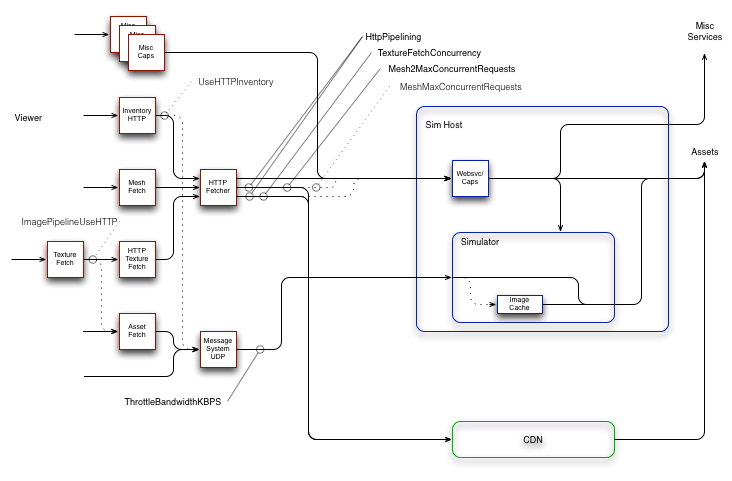
To the left (in red) are pieces of the viewer. To the right (in blue) are simhost/simulators and other backend services. And at bottom (in green) are new CDN services.
Solid lines with arrowheads are communication paths, either UDP or TCP/HTTP. Dashed lines indicate legacy communication paths that are now or soon will be deprecated, obsoleted and/or deleted.
Ball-and-stick objects between a communication path and a text label indicate a viewer debug setting and the communication path or paths that setting influences. These, too, are in solid and dashed flavors. The latter indicating obsolescence. And as always, at least one error crept into my diagram. In this case, the ‘HttpPipelining’ setting only influences mesh and texture communications. Inventory is currently unaffected by this setting. [Image has been corrected – ed]
Generally, things are moving in the direction of simplification and less resource conflict. The mesh and texture HTTP traffic, which is usually the greatest load, tends to part ways with the UDP traffic a few network hops after a user’s router or modem. Lacking TCP’s throttling mechanism, UDP often wins in a fight (give-or-take the efforts of fairness algorithms along the path). Allowing UDP to overrun the path between viewer and simulator does still degrade the experience and the bandwidth setting remains an effective tool for avoiding this problem.
Other settings should generally be left alone. A lot of bad advice was spread around in the community in an effort to work around throughput problems. We’re trying to undo that history and get back on track with more typical (albeit aggressive) HTTP patterns.