Second Life’s Simplified Inventory Project

Now there is an idea… Inventory likely becomes a headache for every user of Second Life. I know I have an ongoing battle with inventory. Now the Lab has come up with a new idea. I suppose it is a spinoff from the SLCC announcement of making SL easier to use.
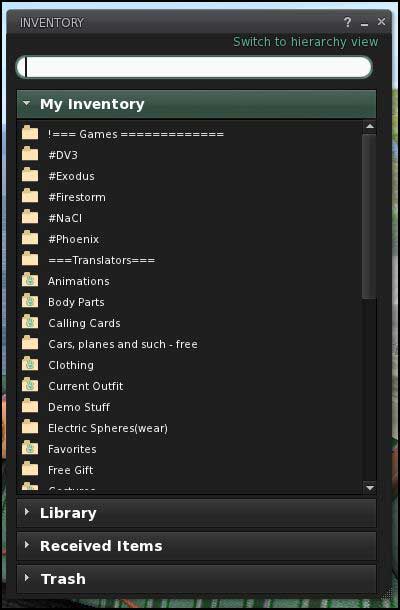
New Folder View Inventory

ProductTeam Linden posted an announcement in the Second Life Forum about the new project to test the idea of a simplified inventory. See: Simple Inventory Project Viewer. They want feedback on the new inventory. They ask you to give them information on how you think it will affect new users. I guess we can put on our newbie avayar and see how it goes.

The project has a Project Viewer, JIRA Section SINV, and a Simplified Inventory wiki page.

Download and Install

This is the standard download (28mb) and install. The viewer installs in its own folder, so there should be little conflict. It also uses its own settings file (settings_projectviewer-simpleinventory.xml). It does share the cache. While I am a great fan of separate caches for each viewer, I have been allowing all the viewers from the Lab to share the same cache. I don’t recommend allowing the Lab’s 1.23 to share a cache with the new 3.x.x viewers.

Read more

#SL Last Names Coming Back

I saw Danial Voyager’s post about a comment in LL’s CEO’s Feed. Rod wrote that last names are coming back in 2012.

You may have been following the JIRA Feature Request to being last names back. See SVC-7125 – Bring Back Last Name Options!

This JIRA had 2,139 votes and 696 watches. That is probably some sort of record. It certainly shows that the most residents do not know the importance of clicking Watch.

There is a stream of new comments added to the JIRA item just about every day.

Racism?

The lack of last names seems to have created a form of racism. New SL users with the last name Resident are claiming discrimination. The only way to know is create a new Alt and walk a mile in their shoes.

Read more

#SecondLife Global Illumination

You may not have noticed the Graphics Setting feature: Global Illumination. It began appearing in viewers some time ago. But, now it has disappeared from the SL Viewer. So, what’s up?

What it is…

Global Illumination is the label used to describe how light is handled in 3D games. Its purpose is to make lighting more realistic. It adds ‘reflected’ light effects. This means if you are standing with a blue wall to the right and the sun to the left, some blue light will be reflecting on to your right side.

Status

Back in May 2009 the Lab, Runitai Linden, posted a video showing new features they were working on. See: SL Tech Demo above.

The video (above) includes Mesh and Global Illumination. At about 1:34 in the video you can see a sun cycle that shows an example of Global Illumination. (GI) Notice how the sun seems to reflect off surfaces and illuminate other surfaces. That is the Global Illumination.

Read more

#Second Life Spell Check

From a post on SL Universe I got a lead to STORM-83 – As a user who cannot type of [SIC] spell to save their life, I want dynamic spell check for everything I type, so I a little bit more literate. 🙂 It has a total of 5 Watchers as I write this.

Several Third Party Viewers have spell check for local and group chat. But, not the SL Viewer. It seems that will soon change. Oz Linden posted in the JIRA to thank Kitty (Barnett? I’m guessing) for the coming spell check feature. I suppose Kitty has contributed the code to add spell check to the SL Viewer. If my guess is correct this Kitty is the Kitty that provides the RLV code used in several third party viewers.

Every so often I forget the SL Viewer does not have spell check and pop open Preferences to turn it on and soon have a Doh! moment. It will be nice to soon have spell check.

Second Life Mute-Block Changing

Second Life users have the ability to block/mute those that people that annoy them, both voice and chat. One can also mute objects that are spamming them. Once blocked you cannot:

  • See text chat, hear voice chat, or receive IMs from that person or object.
  • See particles emitted by the blocked avatar or object.
  • Receive items from the blocked object.

But, muting is not fool proof. You can mute someone in-world and it has no effect in, I think, group chat, the market place or in the new social features. I don’t do much muting…

Running on the release channel Magnum is a new update that has the code to move muting from the simulators into what the Lindens call the People API’s. These are the API’s that will become the primary call for all communication tasks in Second Life. The People API is or will be queried to get the information needed to establish a communication cannel. So, it is in a perfect place to control the communication.

Read more

#SL ARC Replaced

ARC denotes Avatar Render Cost. We have had this tool in the viewer for some time. When used we see a numeric value that is green, yellow, or red. Red denotes the avatar’s render cost is too high… according to someone. It tells me I’m almost dressed…

New Draw Weight Shown Above My Head

You can enable ARC reporting in Viewer 2 and 3 via the top menu. It is in the Advanced item. If you do not have an Advanced item in your menu press Ctrl-Alt-D (viewer 3 is a little strange, if you have a problem try using ‘D’ or ‘Q’ with Ctrl-Alt to get Advanced open). Then in V2: Advanced->Rendering->Info Displays->Avatar Rendering Cost. Or in V3 use: Advanced->Performance Tools->Show Draw Weight for Avatars. The change from old ARC numbers to new Draw Weight numbers is about 10 times greater.

Read more