Blender 2.68 RC1 Released

There is a great article by Gaia Clary in the SL Forum: Blender 2.68: Weight Tools reworked. She is explaining how weight painting in Blender has improved. Tools work as one intuitively thinks they should. I see that as a big improvement. I’ve fought with Blender weight painting for some time.

Also the documentation has been updated. See the Vertex Groups section of the 2.6 manual.

Blender 2.67b is currently the stable release. But, a Blender 2.68 Release Candidate is out. See the Blender download page for the 2.67b version. There is a candidates download page here.

Read more

Blender Accepted to Summer of Code 2013

Summer of Code 2013
Summer of Code 2013

Google Inc. sponsors Summer of Code (SoC) each year for students over age 18. For those under 18 they sponsor Code-In. This year 15 Blender projects have been included in the mix of SoC projects. They are:

  1. Painting tool improvements
  2. Sketch Mesh Editing
  3. VSE Improvements
  4. Dependency Graph and Evaluation Engine Refactor
  5. BGE Level of Detail and Bug Fixing/Polishing
  6. Deformation Motion Blur
  7. Improved Debugging and Profiling in BGE
  8. Viewport FX II
  9. Expand and improve Blender’s motion tracking module
  10. Texturing for Volume Rendering in Cycles
  11. Rigid Body Simulation Improvements
  12. Threaded dependency graph
  13. Cycles – Add new shader nodes and shading features
  14. Towards a full action replay system
  15. Mesh Custom-Data Transfer

I’m not sure how many of these projects will directly affect the Second Life™ community. You can read more about each project on the SoC pages: Accepted Blender Projects. Click the project description to get more information.

Congratulations Blender guys and thanks Google.

Blender 2.67 Released

It’s over a week ago (May 7) that Blender released a new version: 2.67. I just noticed.

Blender Download – Use the Archive version for better compatibility with previous versions.

New in this Release

Free Style

This may seem odd to you, but Blender just got a Free-Style Render Engine that renders non-photorealistic images. See: Blender Free Style for more examples.

Blender 2.67
Blender 2.67

Paint System

The paint system has improvements. Brushes work in more modes and have more features. Bugs in the system have been fixed. 

Read more

Avastar Update RC5-834

Gaia Clary of Machinimatrix.org the home of AVASTAR has a new Release Candidate out: 834. I just installed it. The fix I wanted is not yet in it. Gaia tells me I won’t see that until after the next release. 🙁 But, there are fixes and improvements.

You need your special URL to get the download. But, you can see the release notes here: RC5-834.

Resetting the Origin of an Armature in Blender

The default Second Life animations have odd pivot points in the animations. If you are using them for import to SL then that is a good thing. If you are trying to use the animations for other purposes, like I am to pose the avatar for weighting clothes, it is a problem.

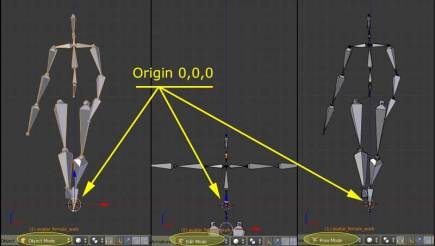
If you import the default SL animation into Blender, the feet are at the Blender 0,0,0 position. If you change to EDIT mode the hip is at the 0,0,0 position. In POSE more, again the feet are at the 0,0,0 position. See the image.

The problem with Default Sl Animations
The problem with Default SL Animations

That does not really matter for our use for making Second Life clothes. But the T-pose only being available in EDIT mode makes it hard to position the imported animation with our clothing avatar.

Read more

Weight Copy Blender 2.66a

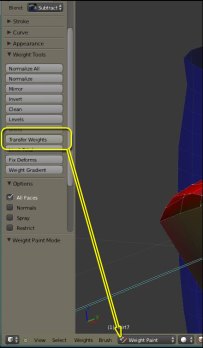
New Blender Feature - Transfer Weights
New Blender Feature – Transfer Weights

You will find that the Weight Copy script that many of us have been using with our clothes building doesn’t work in Blender 2.66a. (Some say it does. I’m not sure.) Gaia Clary is not going to be updating the script for newer Blender versions. She doesn’t need to. Blender now has the ‘copy’ function built in.

This new feature is only visible when you are in Weight Paint mode. The picture shows the Weight Paint Tools panel open. The eighth position is Transfer Weights (and that links to a short tutorial). This takes the place of Gaia’s script.

This new feature gives us way more control than Gaia’s script did. But the selection order for transfers is the same. Select the SOURCE first and the TARGET second.

You may notice some additional tools there too; Blend, Limit Total, Fix Deforms, and Weight Gradient. Look at Blender.org’s documents page: Weight Paint Mode. There you’ll find explanations of the tools and how they work.